

 Procedures for shopping
 Create New Account (Free)
 FAQ
FAQ Cart
Cart
Do your photos end with just the click of a shutter?
With SILKYPIX, refined image processing and natural color reproduction bring out delicate details in landscapes and portraits. By adjusting brightness, color, and tonal gradation after shooting, you can bring your images closer to your vision.
Want to try RAW development and photo editing, but haven’t taken the first step yet?
SILKYPIX Developer Studio Pro12, an easy-to-use RAW development software even for beginners, along with the high-speed viewer Photo ExpressViewer, are now available at a special price.
Overview
- Campaign name
- SILKYPIX® Photo Editing Start Campaign 2026
- Campaign period
- April 9, 2026 - April 27, 2026 (JST)
- Eligible products
-
RAW development software

* If you already own the SILKYPIX® Developer Studio series, you are eligible to purchase it at the upgrade price.
» Click here for upgrade prices details


RAW development software SILKYPIX Developer Studio Pro12
SILKYPIX Developer Studio Pro12 delivers high-quality image processing and natural color reproduction, capturing the subtle light and atmosphere of landscapes as well as the expressions of people. With RAW development and photo editing, you can adjust brightness, colors, and tones after shooting to bring your images closer to your vision.
Because your original photo data remains intact, you can edit repeatedly without worry. You can experiment and refine your images until you’re satisfied, making photo editing approachable and stress-free.
It supports not only RAW files but also JPEG, TIFF, and HEIF images taken with iPhone, so you can work with photos regardless of format. You can focus on composition and timing while shooting, without worrying about camera settings.
Distinctive SILKYPIX Features
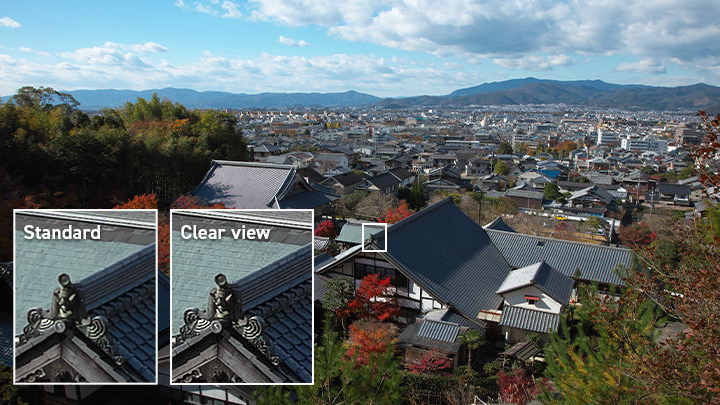
High-definition RAW development
"Clear view" demosaicing for natural and intricate rendering.
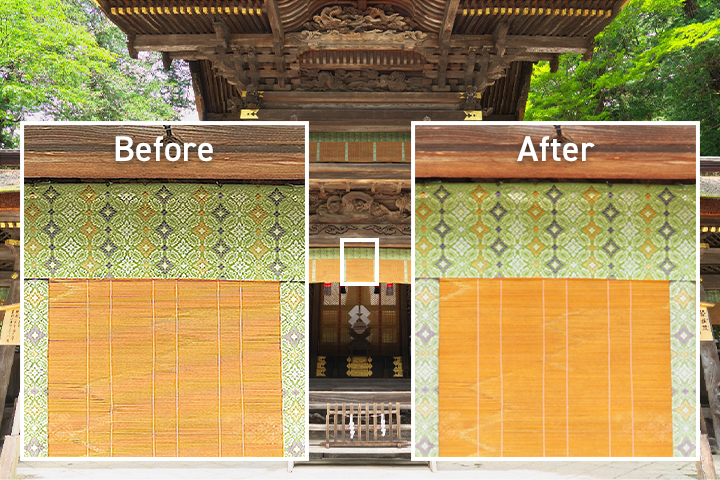
Advanced Compositing Functions
Provides a diverse range of creative possibilities with eight compositing modes, including Multiple exposure, Lighten composite, Motion object removal and Stroboscopic motion. It also features the advanced "Pixel Shift shot RAW composite".


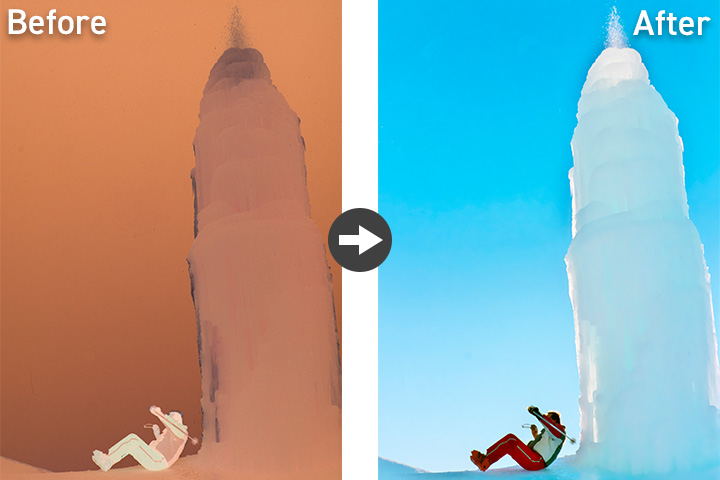
Negative film inversion tool
Inverts negatives to positives, allowing for a finish that leverages the distinctive colors and tonal gradations of film.
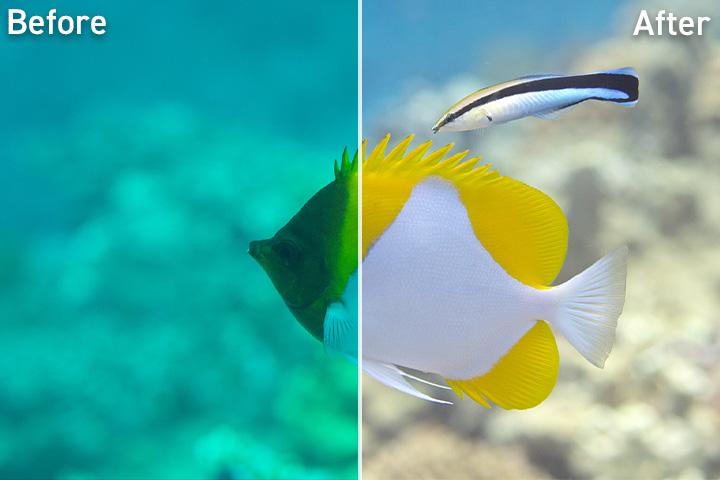
Underwater photo controller
Compensates for color casts and murkiness unique to underwater photography.
Monochrome controller
Enables monochrome expression that leverages color data.
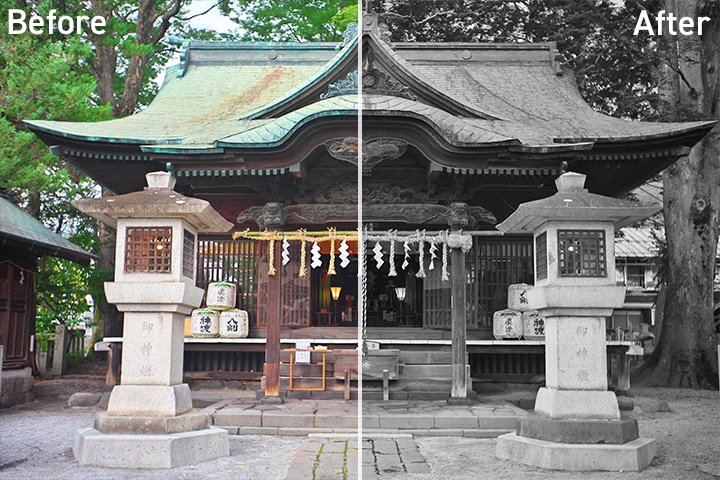
Comprehensive Adjustment Functions
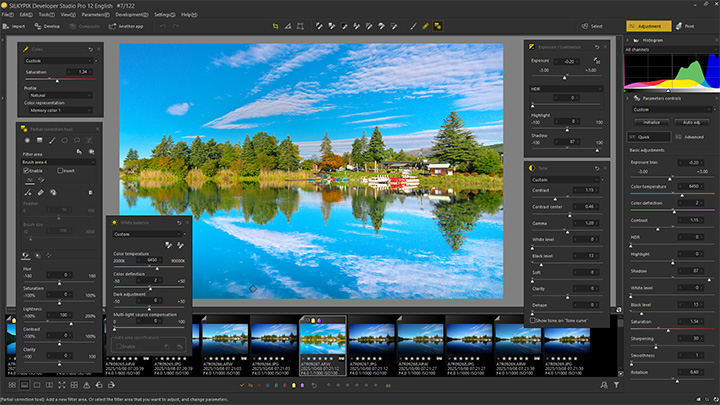
- UI Improvements Switches between button layouts and Quick/Advanced modes for easier and more efficient operation.
- Soft tone adjustment Adds a blur effect to light sources and highlights for a softer impression.
- Enhanced Dehaze function Improves areas that tend to be dark, effectively removing mist and haze.
- Exposure, Tone, Gradation, and Color Correction Provides precise adjustment from highlights to shadows.
- JPEG and HEIF adjustment "SILKYPIX RAW Bridge" enables corrections in a state close to RAW.
- Partial correction Freely perform pinpoint corrections down to the smallest detail.
- Retouch brush Easily and naturally removes unwanted objects to improve the perfection of your work.
In addition, the software is equipped with a wide variety of functions that cannot all be introduced here.
For detailed functions and specifications, please view the "Product Details" for each product below.
- Eligible products
-
RAW development software
Professional-grade RAW development software for pursuing high-definition rendering. It maximizes the richness of RAW data to achieve delicate gradation and natural color reproduction.
Recommended for:
- Those who are interested in getting started with RAW processing and photo editing.
- Those who want to go beyond just taking photos and create finished works of art.
- Those who are particular about natural color reproduction and subtle tonal gradations.
- Those looking for a one-time purchase photo editing software.
- Those considering switching from their current editing software.
* If you already own the SILKYPIX® Developer Studio series, you are eligible to purchase it at the upgrade price.
» Click here for upgrade prices detailsHigh-speed viewer software

A reliable, one-time purchase Japanese-made photo viewer software. It allows fast viewing and organization of large photo collections, making it easy for beginners to manage their work comfortably. It supports RAW images, including RAW files from major cameras such as Canon, Nikon, and Sony, with features like thumbnail display, detailed information viewing, and selection. Additionally, photos can be efficiently organized using 5-star ratings and color labels, and filtered by shooting date or EXIF information. Sorting by file name or other details is also simple and intuitive.
Recommended for:
- Those who want to efficiently organize and browse large photo collections.
- Those who want to comfortably view and select images, including RAW files.
- Those looking for software focused on viewing and organizing, without image editing features.
- Those seeking a reliable, one-time purchase software they can use for a long time.